


Sending a broken laptop to a vendor is one of the most routine jobs in IT. Yet ask most teams which devices are away right now, who is chasing them, or what repairs cost this year, and nobody can pull the answers together at once.
A single repair involves more people than it first appears. IT confirms the fault, arranges service with a vendor, tracks the device, and decides when it can go back into use. If fixing it is expensive or it’s near the end of its life, procurement may weigh a replacement instead. With that many hands involved, the process works best when everyone sees the same picture in one place.
So let’s explore how teams typically handle IT asset repairs, and how scattered information can be pulled together with Jira and an asset management tool built inside it. If you’re a Jira administrator supporting IT asset management, service operations, vendor management, or procurement, this one’s for you.
You’ll learn:
- The common stages most IT asset repairs go through, and where information gets lost along the way.
- How to close those gaps with your Jira workflow and an IT asset management tool.
- How AssetIT automation changes an asset’s status automatically when its Jira ticket moves.
The problem: repairs leave the building; information doesn’t follow
Think about what changes the moment a laptop leaves the building. Someone outside your organization now holds it. The data on it sits outside your security perimeter. Money may need approval. And honestly, nobody knows for sure when, or even whether, it’s coming back.
If the process around that moment is informal, the same problems show up again and again:
- Ghost inventory: The asset register still shows the device in service, so stock counts and reports are wrong.
- Lost follow-ups: The agent who shipped the device moves on, and nobody else knows the vendor’s case number.
- Data exposure: A laptop leaves with company data on it because nobody owned the wipe.
- Unplanned spend: An out-of-warranty quote gets approved by whoever answers the email, with no view of the device’s age or value.
- Idle employees: The user waits a week without a device, or gets a loaner nobody tracks.
- No memory: The next time the same model fails, there’s no record of how often it has failed before.
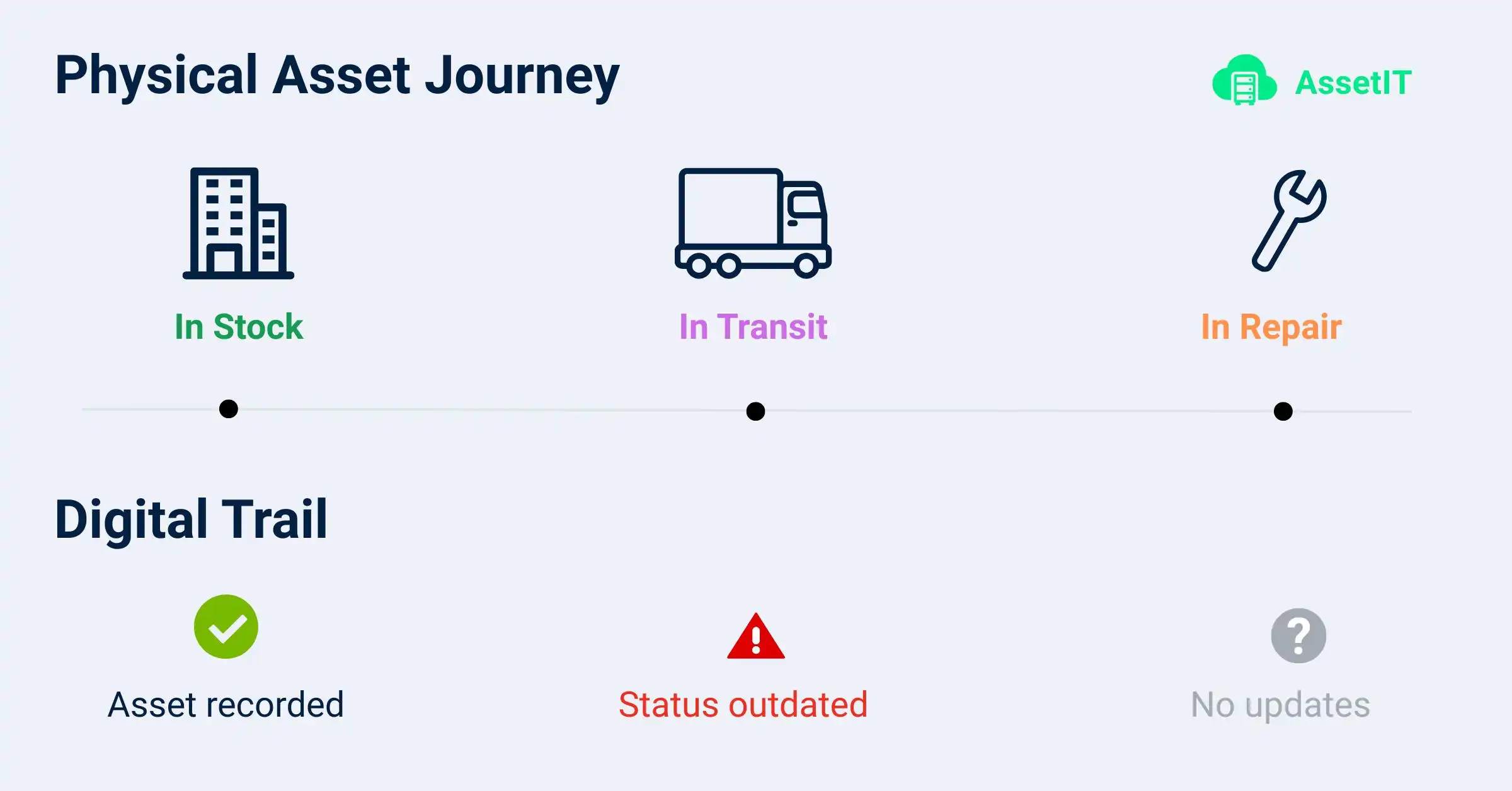
Here’s the thing: none of these is a tooling problem first. They’re process gaps, and no tool will fix them until the process itself is clear. So let’s start there.
How teams typically handle a repair
A repair isn’t one task. It’s a chain of handoffs and decisions, and each one produces information somebody will need later. Whatever tools a team uses, most repairs go through these seven stages:
Stage | What happens | The key decision | Usually owned by |
|---|---|---|---|
| The user reports a fault; IT confirms it needs outside repair | Repair internally or externally? | IT support |
| IT checks warranty, repair history and vendor options | Warranty claim, paid repair or replace? | IT support, asset manager |
| Data is wiped, a case or RMA number is obtained, a loaner is issued, and the device ships | What happens to the data, and does the user need a loaner? | IT support |
| The vendor diagnoses the fault and, out of warranty, sends a quote | Is the quote and timeline acceptable? | Vendor, followed up by IT |
| Someone approves the vendor’s quote or chooses a replacement | Repair, replace or extend the loaner? | IT manager, procurement |
| IT tests the returned device and checks it’s the same unit | Is it fit to go back into service? | IT support |
| The device returns to its user, costs are recorded, or the old device is retired | What did this repair teach us? | IT support, asset manager |
Now match that against the problems. Ghost inventory starts at stage 3, when the device leaves but the asset register isn’t told. Lost follow-ups happen at stage 4, unplanned spend at stage 5, and “no memory” at stage 7, when the ticket closes, and the repair cost goes nowhere. The trouble isn’t inside any one stage. It’s in the gap between where the work is tracked and where the device is tracked.
Model the IT asset repair process in Jira
There’s no single right way to set up repairs in Jira. What fits depends on who owns the vendor relationship, how many repairs you handle, and whether procurement works in Jira. Whichever setup you choose, it starts with the same five decisions.
Five decisions to make before you configure anything
- Out-of-service point: Most teams count a device out of service when it can no longer be assigned, usually when it physically leaves. This decides which ticket transition should change the asset’s status.
- Repair ownership: One named internal owner per repair works best, even while the vendor does the work. This decides who stays assignee during the vendor stage.
- Repair-or-replace rule: A common rule is a cost threshold: IT approves below it, procurement decides above it. This decides where the approval step sits.
- Loaner policy: Teams with frequent repairs keep a small pool, sized to their usual peak. This decides whether issuing a loaner is part of the handoff.
- Vendor tracking depth: Track only the steps that change what your team does next. This decides how many statuses you need.
Common ways to model the IT asset repair process in Jira
With those decisions made, here are the setups we see most often.
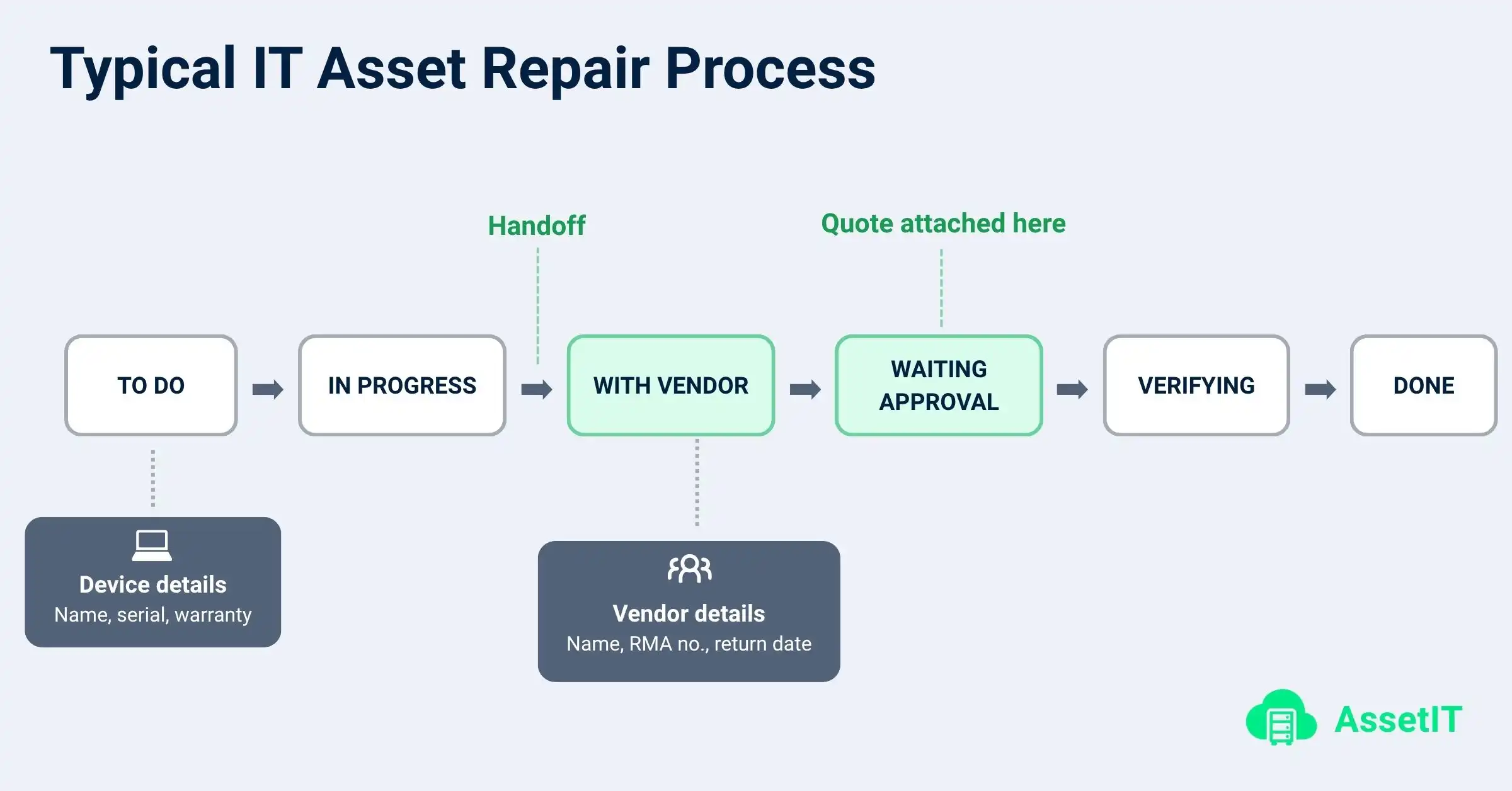
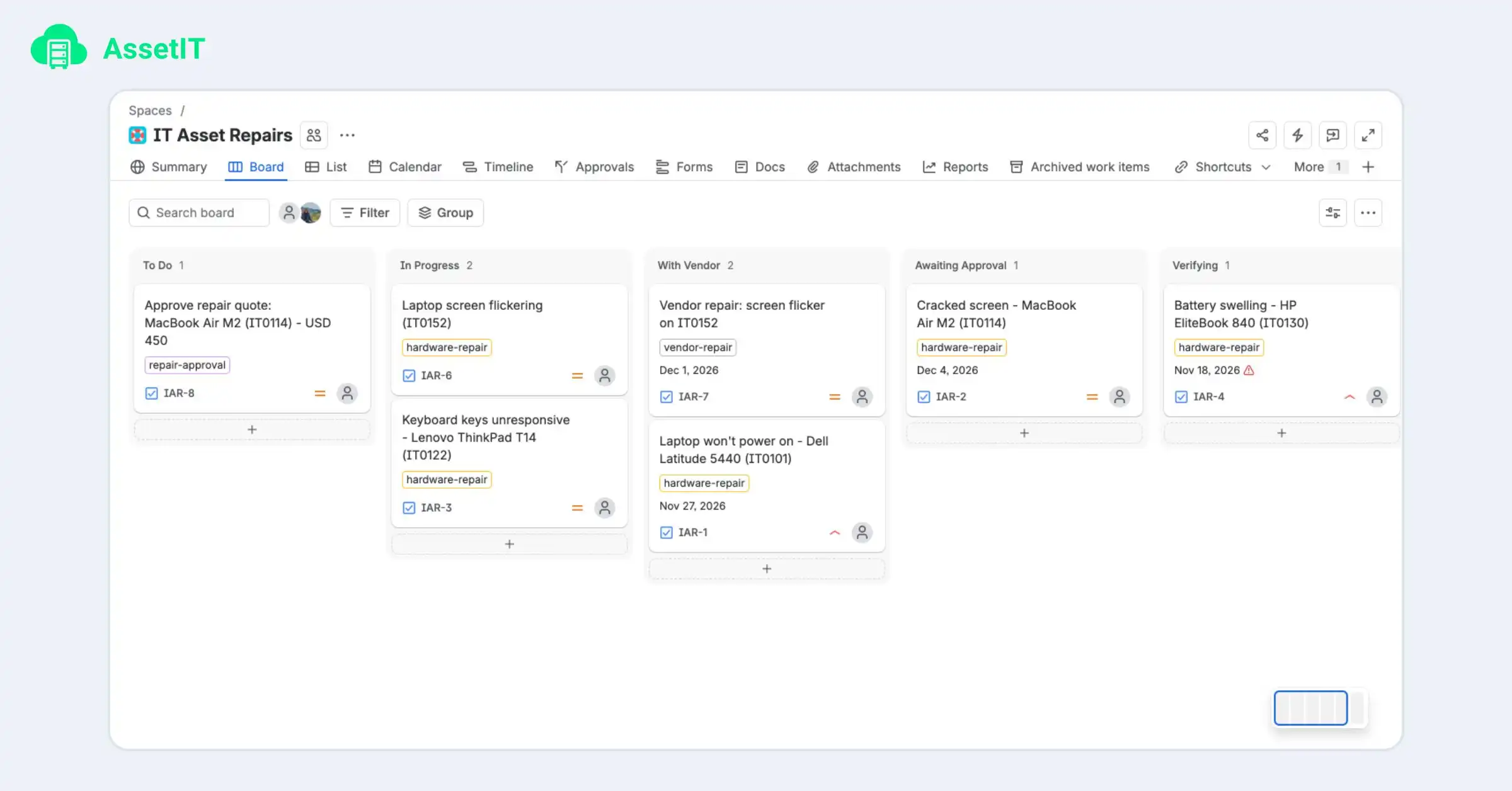
- Repair statuses on the user’s request: The ticket the user raised gets extra statuses such as With Vendor and Awaiting Approval, so the whole repair is tracked on that one ticket. It works when one team handles the whole repair, but the ticket workflow can get long.
- A separate repair ticket: The user’s request stays simple, and IT opens a second ticket just for the vendor repair, linked to the first. It fits when an asset team owns repairs or volume is high, but there are two tickets to keep in step.
- A separate approval request: When a quote or replacement needs approving, procurement gets its own request, linked to the repair ticket. It fits when procurement already works in Jira, but the decision sits apart from the rest of the repair work.
- The asset record only: Jira stays as it is, and each repair is logged in the asset’s maintenance record. It fits when repairs are rare, but you lose tracking and automation in Jira.
- Whichever one you go with, a few principles still apply:
- One handoff event: mark the moment the device leaves with a single status, transition or resolution. Automation and reporting both depend on it.
- Required handoff details: use a transition screen with required fields for the vendor, the case or RMA number, and the expected return date, so the handoff becomes a checkpoint rather than a label.
- Approval at the decision point: put the approval where repair-or-replace is decided, with the quote attached, not on the ticket as a whole.
- A linked device: Link whatever ticket tracks the vendor repair to the asset, so the asset record can follow it.
- Lean statuses: add a status only for a moment that changes what someone does next.
Track the device, not just the ticket
A Jira workflow tracks the work: who owns the repair ticket, what was decided, and why. It can’t tell you whether the laptop can be assigned right now, what it originally cost, whether its warranty still covers this fault, or that it has already been to the vendor twice. Those are facts about the device, and they outlive any single ticket.
Keeping those facts is the job of IT asset management (ITAM): one record per device, carrying its status, owner, costs, and history through its whole life. Without that record, every decision in the previous sections falls back on a spreadsheet or someone’s memory.
AssetIT – IT asset management for Jira
For teams working in Jira, the real question is where that asset record lives. In a separate tool, someone has to copy updates across every time a ticket moves, and that copying is exactly where the problems at the start of this article come from. AssetIT is an IT asset management app that runs inside Jira, so there’s nothing to connect or copy: the device record sits right on the repair ticket, uses the same Jira users and reacts to the same ticket changes. Here’s how that handles the problems we started with:
- Ghost inventory: AssetIT’s automation connects Jira status transitions to asset statuses, so when a ticket moves, the linked asset’s status changes with it. The asset register stays accurate without anyone updating it by hand.
- Lost follow-ups: The Linked Assets panel puts the device right on the work item, so whoever picks up the ticket sees exactly which laptop it’s about and can open its full record in one click, instead of hunting through a spreadsheet.
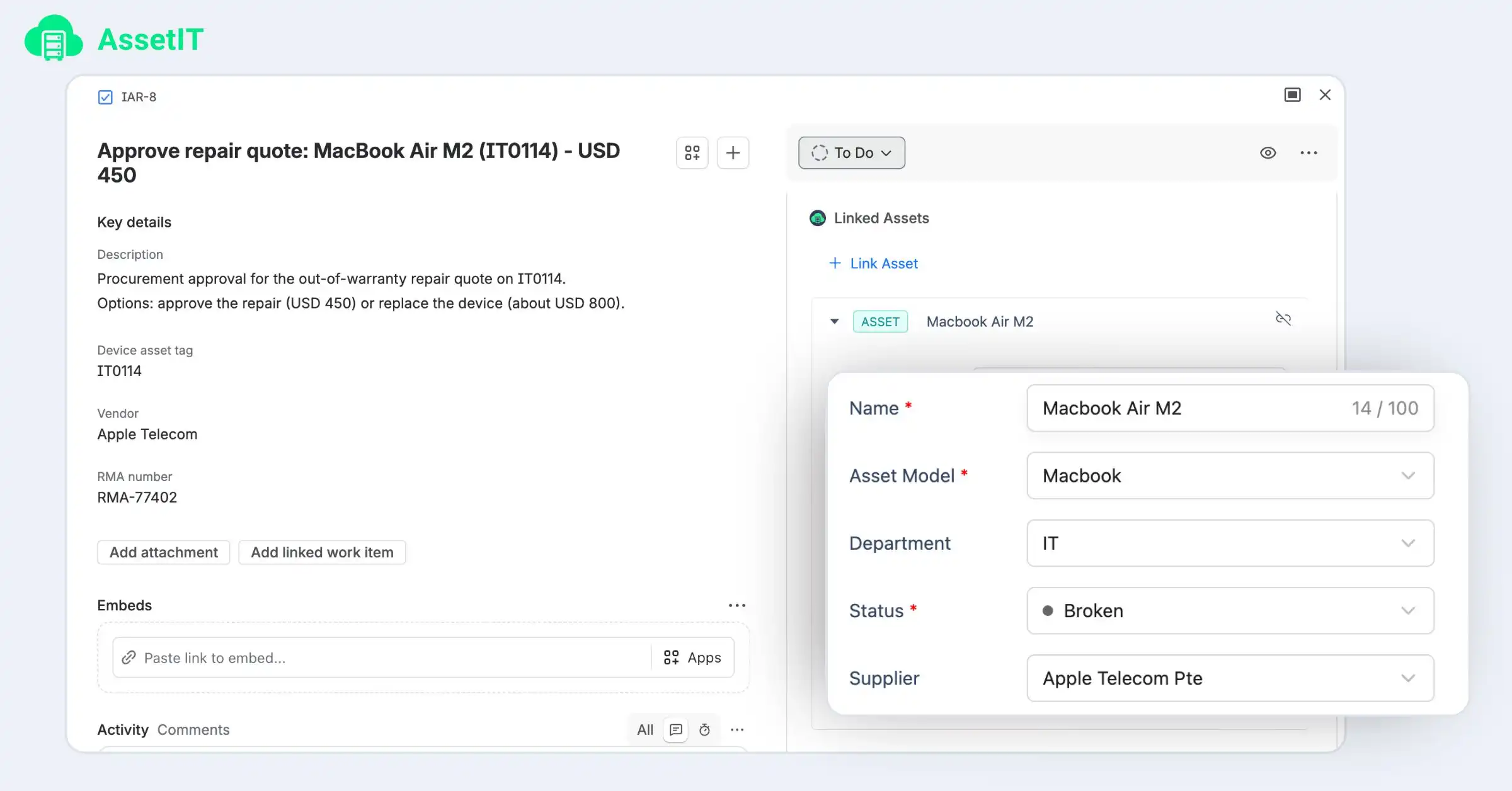
- Unplanned spend: Purchase cost, remaining warranty, depreciated value and end-of-life date sit on the asset record, one click from the ticket, so whoever approves the quote decides with the numbers in view.
- Repair-or-replace: Many teams compare the quote with the device’s current value – if the repair costs more than a set share of what the device is still worth, they replace it. AssetIT calculates that value automatically from each asset model’s depreciation rule.
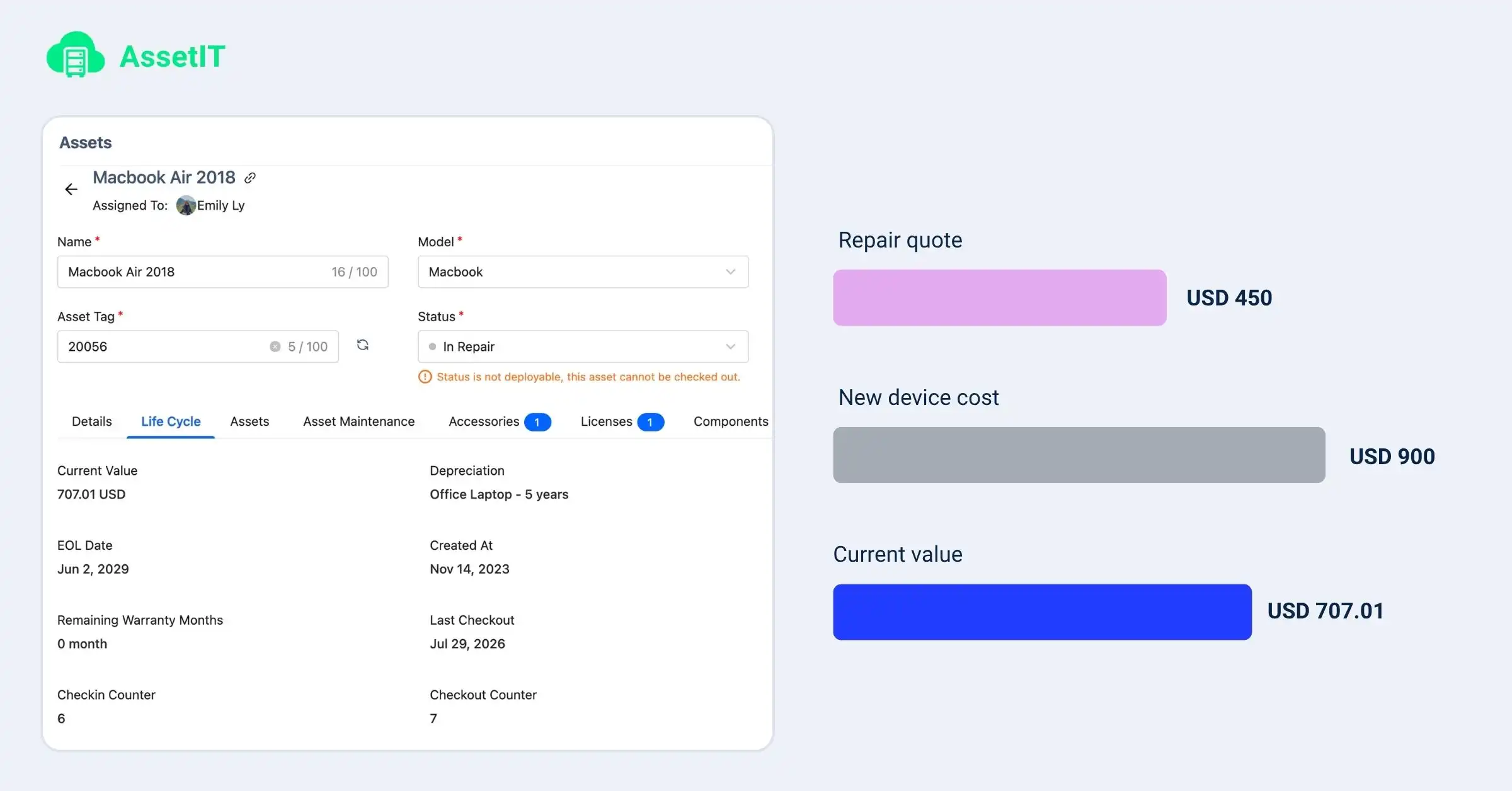
- Idle employees: Loaners are tracked like any other asset. Check one out to the user, or book it with a return date, and you always know who has it.
- No memory: Every repair is logged in the asset’s maintenance history, with the vendor, dates, cost and invoices, so the next repair-or-replace decision starts with the full story.
Which repair events should change the asset status
The asset status answers one question: can this device be assigned right now? So it should change only when that answer changes, not at every step of the repair. Here’s how that works out across the process:
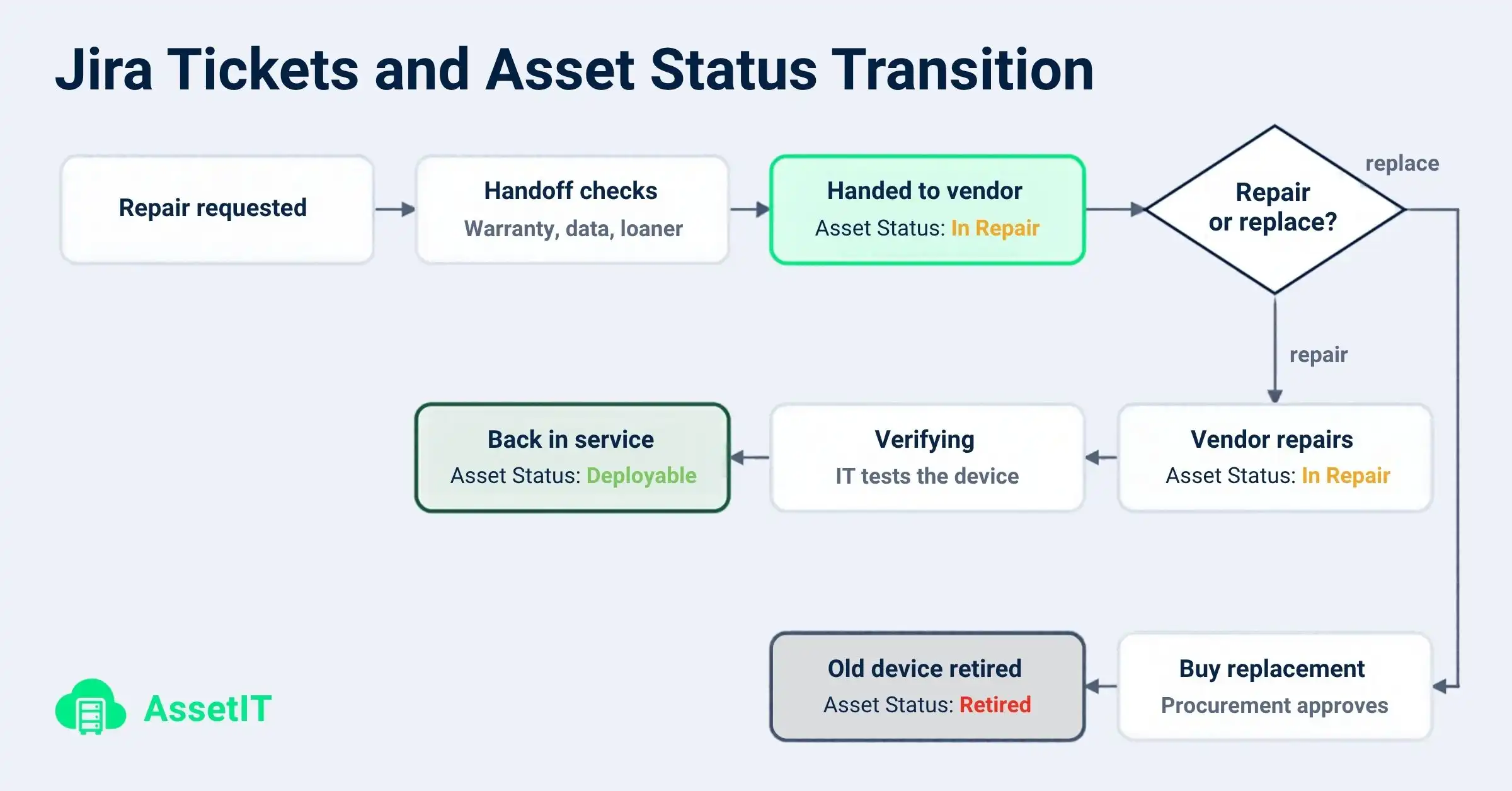
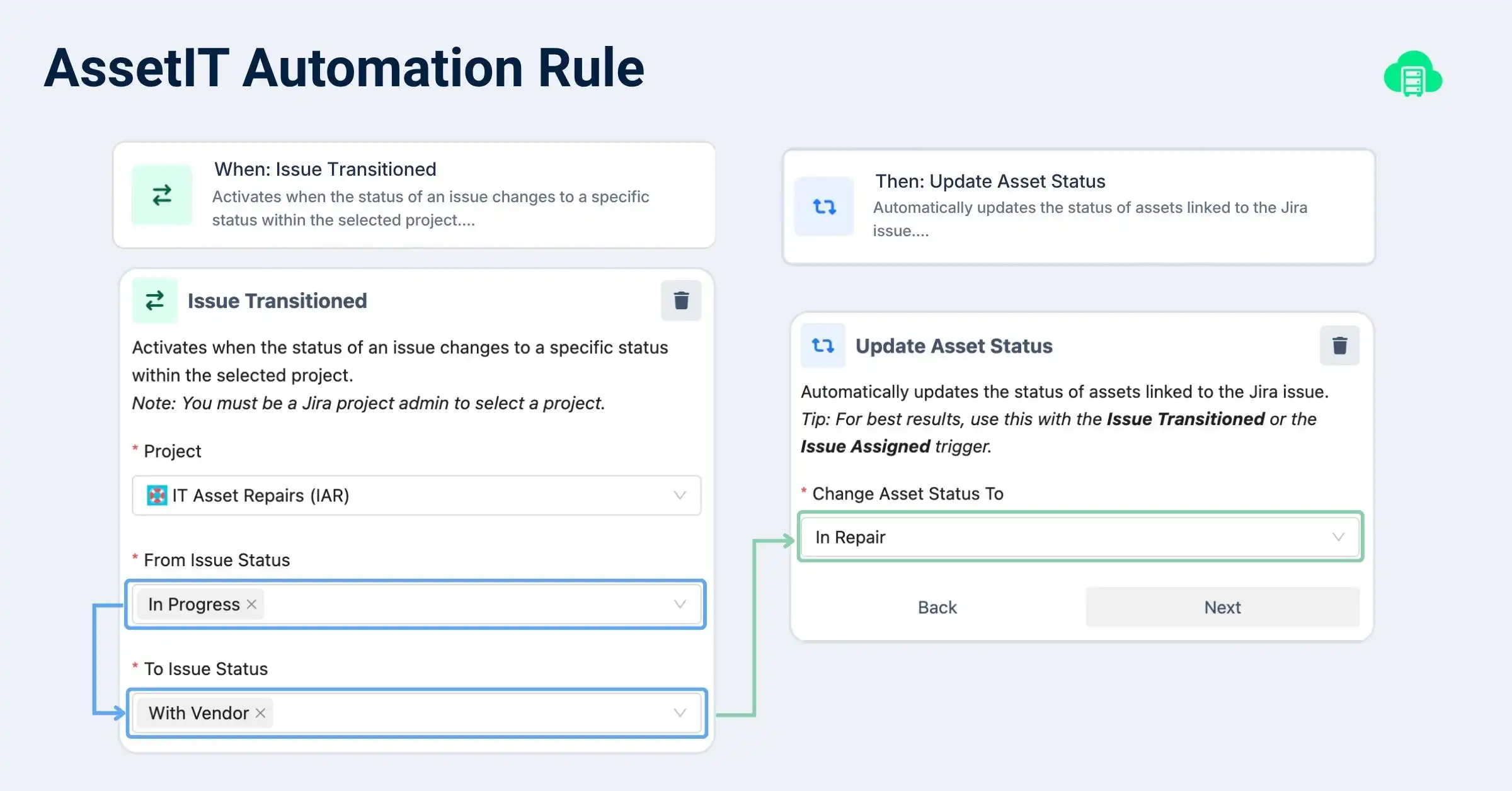
In AssetIT, these changes happen automatically: when the ticket’s status changes, the asset’s status changes with it, so nobody has to update it by hand. Its Issue Transitioned trigger watches the transition you choose, and its Update Asset Status action changes the assets linked to that work item. The setup below shows how to build it.
Automatically update asset statuses when a Jira ticket moves
Here is how to set up an automation that, when a Jira ticket moves to With Vendor, automatically changes the linked asset in AssetIT to In Repair. It then changes back to Available once the device returns and is checked. This works for teams that track repairs on a work item with its own statuses, either the service request itself or a linked repair item. Your status names will likely differ, and that’s fine; the shape stays the same.
What you need: Jira admin rights for the workflow, project admin rights on the project the rule watches, and AssetIT installed in your Jira environment, with AssetIT App Admin rights to create automation rules.
- Mark the handoff in Jira: Add a status that means the device has left, here called With Vendor, and add fields to the work item for the vendor, the case or RMA number and the expected return date.
- Create the status label: In AssetIT, go to Reference Data > Status Labels, click +Status Label and create an In Repair status label with the Pending status type. Ensure that you also have a Deployable status type available in your instance.
- Turn on the panels: In Project settings > AssetIT Integration, switch the integration on and choose the issue or request types that show the panels. Link the device to the work item through the Linked Assets panel.
- Build the rule: In AssetIT Automation, click + Automation, choose Issue Transitioned, select the project and set To Issue Status to With Vendor. Add the Update Asset Status action set to In Repair, name the rule and switch it on.
- Close the loop: A second rule watches the transition that means “verified and back in service” and sets the asset to Available. If the device should go straight back to its user, the same trigger also supports Checkout resources linked to the issue, to the reporter, the assignee or a chosen user. Test this pair on one device first.
Read full step-by-step to set up the Automation Rule at: AssetIT Automation Guide ->
Want to try this rule on your own repairs? AssetIT is free for teams of up to 10 Jira users, and larger teams get a 30-day free trial. Try AssetIT free on the Atlassian Marketplace ->
Checklist for your IT asset repair process
Let’s make it concrete with one common setup. It suits teams that track the repair on a work item with its own statuses, either the service request itself or a linked repair item. Your status names will probably be different, and that’s fine; the shape stays the same.
- Which devices are with vendors right now, and since when?
- Who owns the follow-up on each repair, and could someone else pick it up tomorrow?
- Who decided to repair rather than replace, and on what evidence?
- Does the asset record change only when a device’s availability changes?
- When a device comes back, who confirms it’s ready to use?
If any answer is “we’d have to ask around”, that’s your starting point. The handoff to the vendor and the decision after the quote carry most of the risk, so those are the two moments where Jira and your asset record really need to agree.
Frequently Asked Questions
Can Jira change an asset’s status automatically when a repair ticket moves?
Yes, with AssetIT. Its automation pairs an Issue Transitioned trigger with an Update Asset Status action, so when a work item moves to the status you choose, such as With Vendor, the assets linked to it change to the status you set, such as In Repair.
Do I need Jira Service Management?
No. AssetIT’s Linked Assets panel and automation rules work in Business, Software and Service projects. Jira Service Management adds the customer portal, where customers can also see the device linked to their request.
What if the vendor sends back a different unit?
Update the serial number on the asset record so it matches the device now in hand; the asset’s history keeps the trail. If the device was replaced rather than repaired, retire the old asset and add the new one as a new asset.
How much does AssetIT cost?
AssetIT is free for teams of up to 10 Jira users and priced per user above that, billed through the Atlassian Marketplace. There’s a 30-day free trial, and there’s no limit on the number of assets you track. See more at AssetIT Pricing ->





Recent Comments