

Choosing an IT asset management app for Jira isn’t as simple as comparing feature checklists.
Two apps might both support asset tracking, Jira integration, and reporting, yet solve different problems. One may focus on collecting device information, while another helps teams manage what happens to those devices throughout their lifecycle.
At DevSamurai, we’ve spent years building applications for the Atlassian ecosystem, including AssetIT. One thing I’ve learned is that a product can change much faster than the information people find about it.
Today, AssetIT supports scheduled device imports through its companion Asset Importer app, operational workflows beyond inventory tracking, and an Atlassian Enterprise Certified designation for its Cloud edition.
But I’d rather show what AssetIT can do, where its limitations are, and what you should check before choosing it.
Here are six common questions worth answering.
1. Can AssetIT automatically synchronize devices from Intune and Jamf?
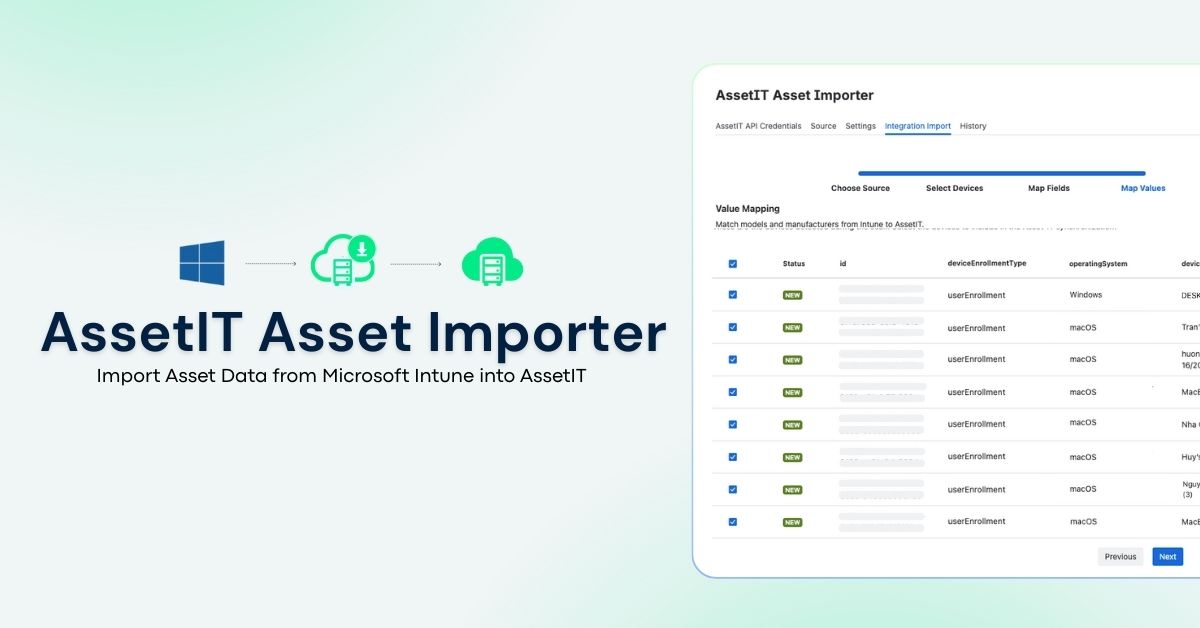
Yes, with a companion app, AssetIT Asset Importer. It pulls device data from Microsoft Intune and Jamf Pro into AssetIT, creating new asset records or updating existing ones.
The two systems do different jobs. Intune and Jamf manage devices and keep them secure. AssetIT tracks what happens to those devices as assets: who owns them, where they are in their lifecycle, and how they’re governed. Asset Importer connects the two, so your asset records start from system-sourced data instead of manual entry.
What’s imported depends on the source. From Intune: model, manufacturer, serial number, OS and version, ownership, assigned user (when available), network information, and enrollment and management status. From Jamf: model, serial number, asset tag, OS version, IP address, processor type, ownership, and enrollment history and status.
As of AssetIT Asset Importer 5.7.0, released October 8, 2026, imports can also run on a schedule (daily, weekly, or monthly), so records stay current without repeated manual imports.
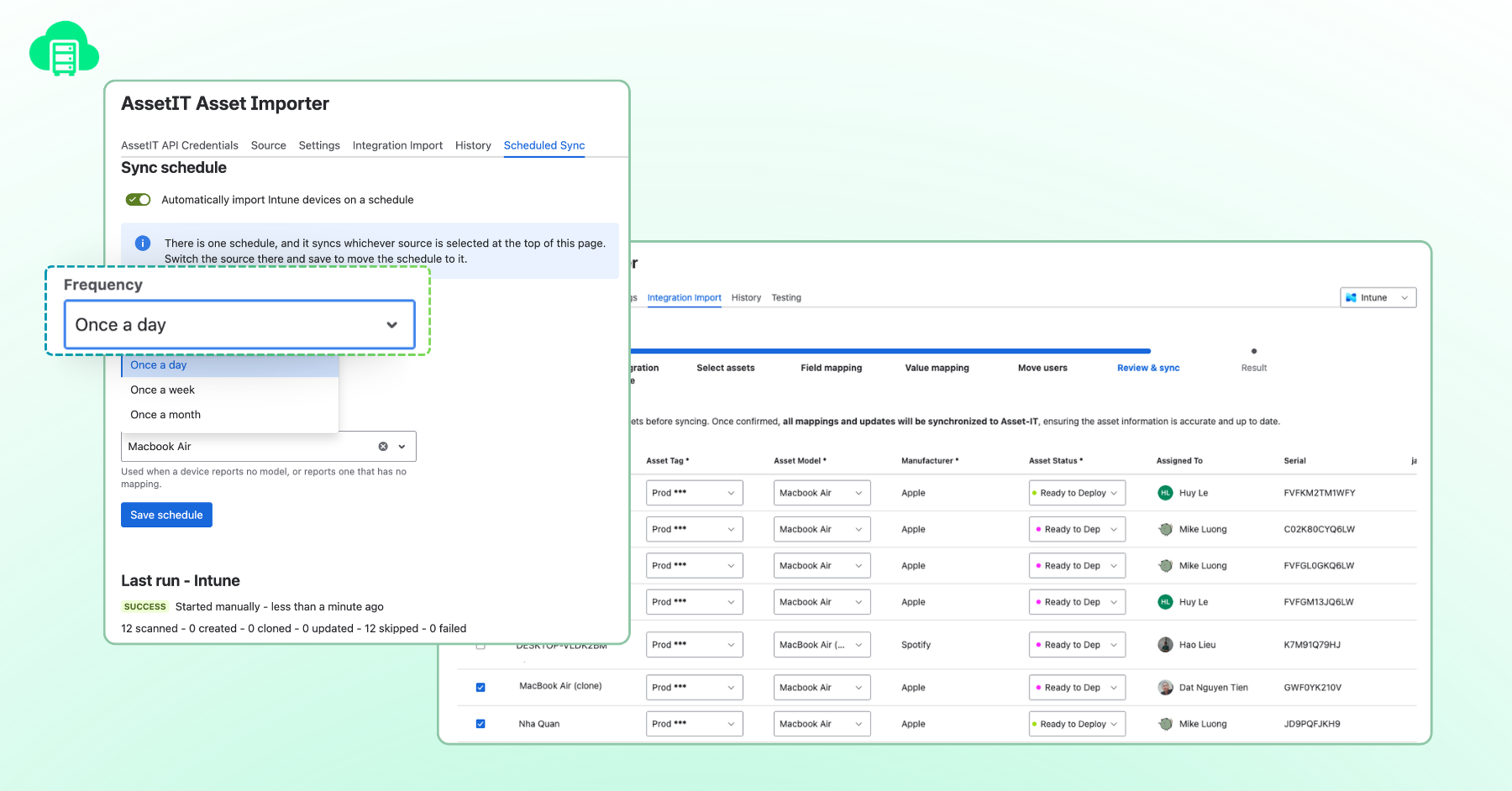
Consider a company managing hundreds of laptops through Intune. IT can import the existing inventory, map fields, and schedule a monthly sync. Those records then feed AssetIT’s assignment, maintenance, and lifecycle workflows.
There are two limitations worth knowing. Asset Importer is a separate application, and its scheduling system currently supports one active schedule at a time, associated with the selected source. Also, existing Intune users should also know that version 5.7.0 introduced a new connection method. You’ll need to reconfigure previously configured Intune connections.
What you can test: Import a representative set of devices, change an assignment in Intune or Jamf, and check the result after synchronization. Review skipped, updated, and failed records to understand how exceptions are handled.
That’s more useful than a comparison table that simply says “Automatic Sync: Yes.”
Documentation: Asset Importer | Scheduled Sync | Version 5.7.0 Release Notes
2. Is AssetIT only suitable for small Jira teams?
AssetIT has a free entry point for small teams, but that doesn’t define the limits of its functionality. A small company might need to track laptops and monitor assignments. A larger organization may require multiple inventories, different permissions, asset allocation, maintenance, reporting, and employee custody verification.
AssetIT supports these workflows and is available for Jira Cloud and Jira Data Center. It also has an important new enterprise credential. It also has an important new enterprise credential.
AssetIT is Atlassian Enterprise Certified
AssetIT has received the Atlassian Enterprise Certified (AEC) designation for its eligible Cloud application.
Atlassian introduced AEC to recognize Marketplace apps that meet additional enterprise requirements covering security, compliance, reliability, privacy, accessibility, and responsible AI use where applicable.
The requirements include independently verified compliance evidence such as SOC 2 Type II or ISO 27001, annual penetration testing, vulnerability management, incident response practices, and accessibility documentation. For IT, security, and procurement teams, this provides a more consistent starting point for evaluating an application’s enterprise readiness.
However, certification doesn’t establish a maximum deployment size or guarantee performance under every workload. Those need to be evaluated separately. AssetIT provides configurable inventories and permission schemes, including controls over who can view, create, edit, check out, and manage different types of resources.
For larger deployments, we’re happy to work with customers on a proof of concept using data volumes, permissions, and workflows comparable to their actual environment. Also, AEC applies to the eligible Cloud application, not automatically to the Data Center edition.
What you can test: Create multiple inventories and permission groups. Import a representative dataset, then evaluate search performance, reporting, and common operations under realistic conditions.
Documentation: Atlassian Enterprise Certified | AssetIT Permissions
3. Does AssetIT do more than track hardware and reservations?
Yes. Tracking and booking are where many teams start, but AssetIT covers the whole lifecycle of an asset, from the day it’s assigned to the day it’s returned or retired.
Take a laptop for a new employee. IT buys it, sets it up, assigns it, repairs it when something breaks, maybe moves it to another person, and eventually retires it. Most problems happen between those steps: equipment that isn’t returned, repairs nobody recorded, or assignments that are out of date. AssetIT is built to manage those handoffs.
It supports:
Assignment, check-out, and check-in, so you always know who has what
Booking, for shared equipment that people reserve for specific dates
Maintenance records, so repairs and servicing are logged against each asset
Custody verification, where employees confirm they still have their assigned equipment and its condition
It also goes beyond hardware. AssetIT manages software licenses, accessories, components, and consumables, so a keyboard, a spare charger, or a license seat can be tracked just like a laptop. You can also group these items into a Predefined Kit and set it to be assigned automatically to new Jira users.
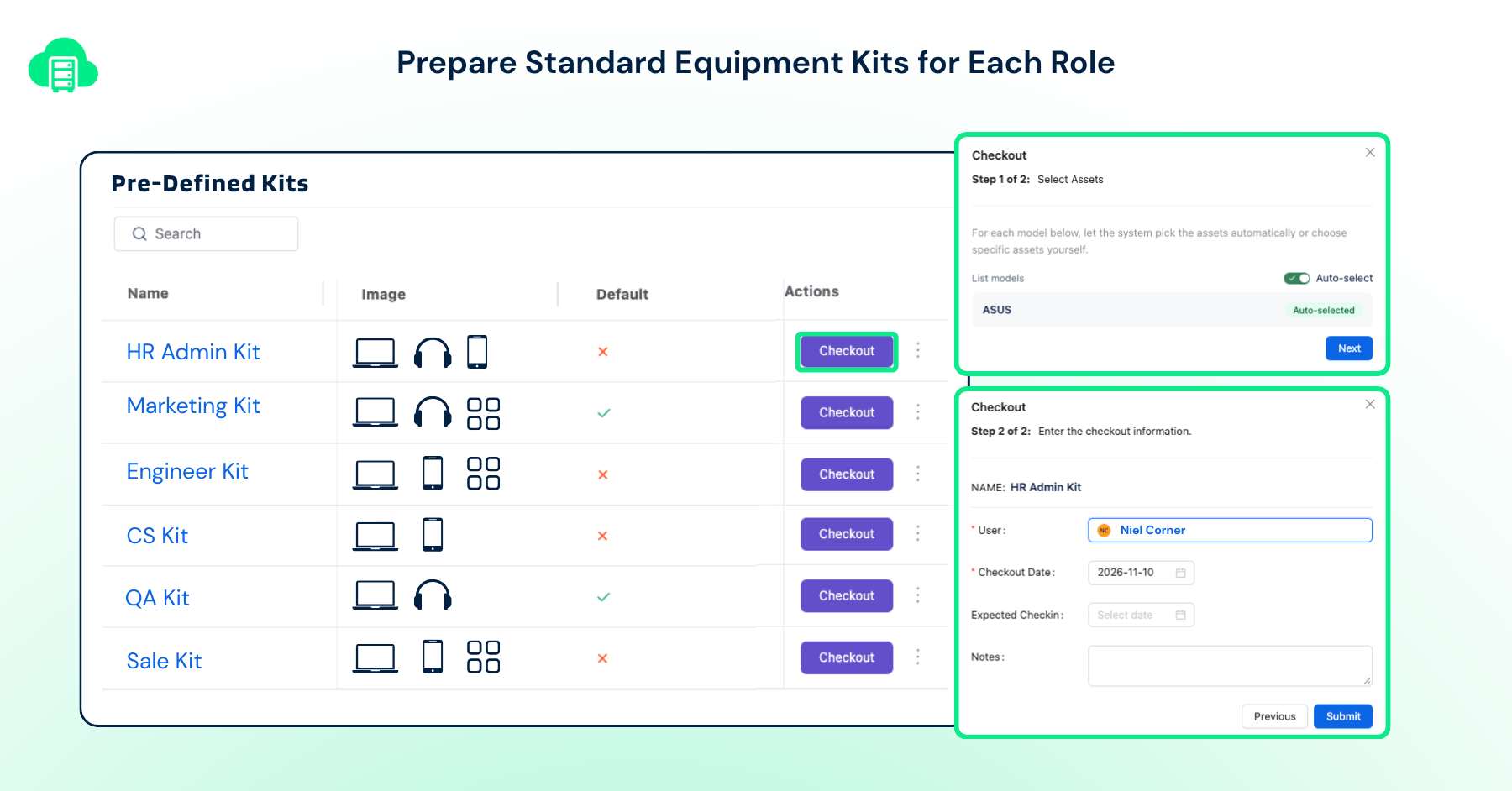
That covers onboarding. For offboarding, AssetIT can automatically check in a person’s assigned resources when their Jira account is deactivated.
Neither setting replaces a full onboarding or offboarding process, but together they handle the repetitive work and keep asset assignments accurate when people join or leave.
What you can test: Create an onboarding kit, assign equipment to a test employee, record a maintenance event, and run through the return process. Check what happens automatically and what still requires approval or manual action.
Documentation: Pre-Defined Kits | General Settings
4. How much asset information can support agents access inside Jira?
Linking an asset to a Jira work item is useful, but the more important question is what an agent can actually do with that connection.
Suppose someone reports that their laptop keeps crashing. The support agent needs to identify the device, check its assignment, and possibly record a repair or replacement.
AssetIT provides several panels inside Jira work items.
The Linked Assets panel connects resources to work items and allows authorized users to edit asset information without leaving Jira.
The Resources Embedded panel displays resources assigned to a selected user, using the work item reporter by default.
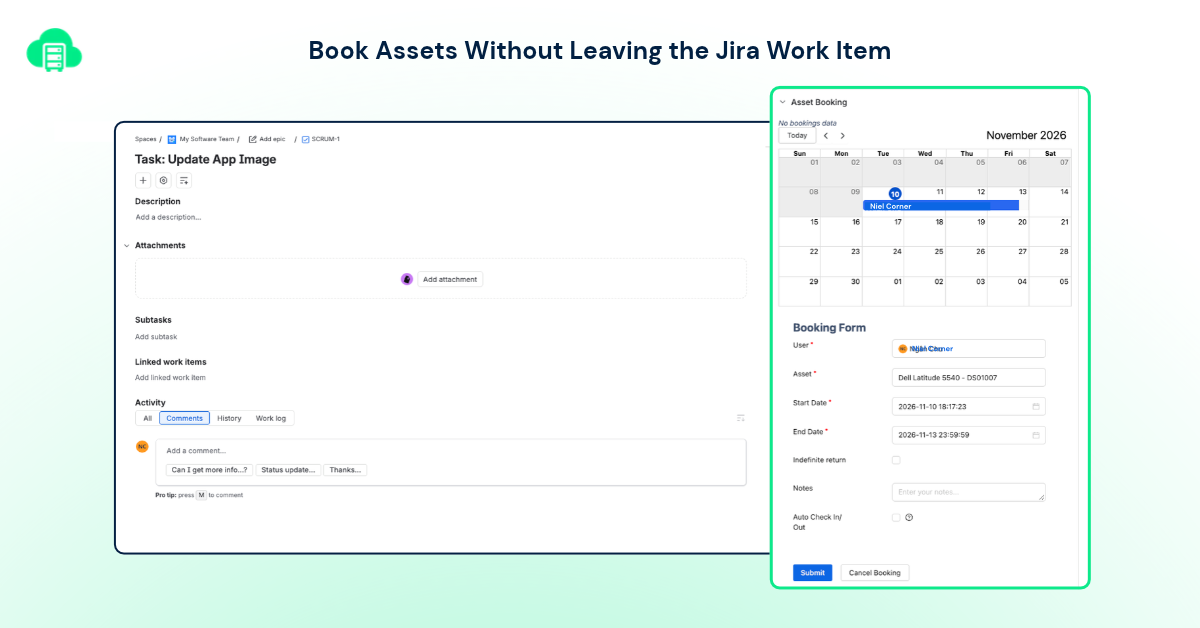
The Asset Booking panel lets users request resources directly from Jira. Relevant features are also available through Jira Service Management customer portal workflows.
This can reduce the amount of switching between service tickets and inventory records.
However, displaying an asset’s information isn’t necessarily the same as presenting a consolidated history of every related service ticket.
If your support team relies heavily on previous incidents, repairs, and service interactions, compare that exact workflow rather than assuming all asset-linked ticket panels behave alike.
What you can test: Create a service request for a test employee, inspect their assigned resources, link a device, and check what the support agent can view or edit without leaving the work item.
Documentation: AssetIT Panels in Jira Work Items
5. Can AssetIT support asset audits and accountability?
Yes, through resource history, reporting, and custody verification.
Let’s say your inventory shows 200 laptops assigned to employees. That tells you what the database believes. It doesn’t necessarily tell you whether those employees still possess the equipment.
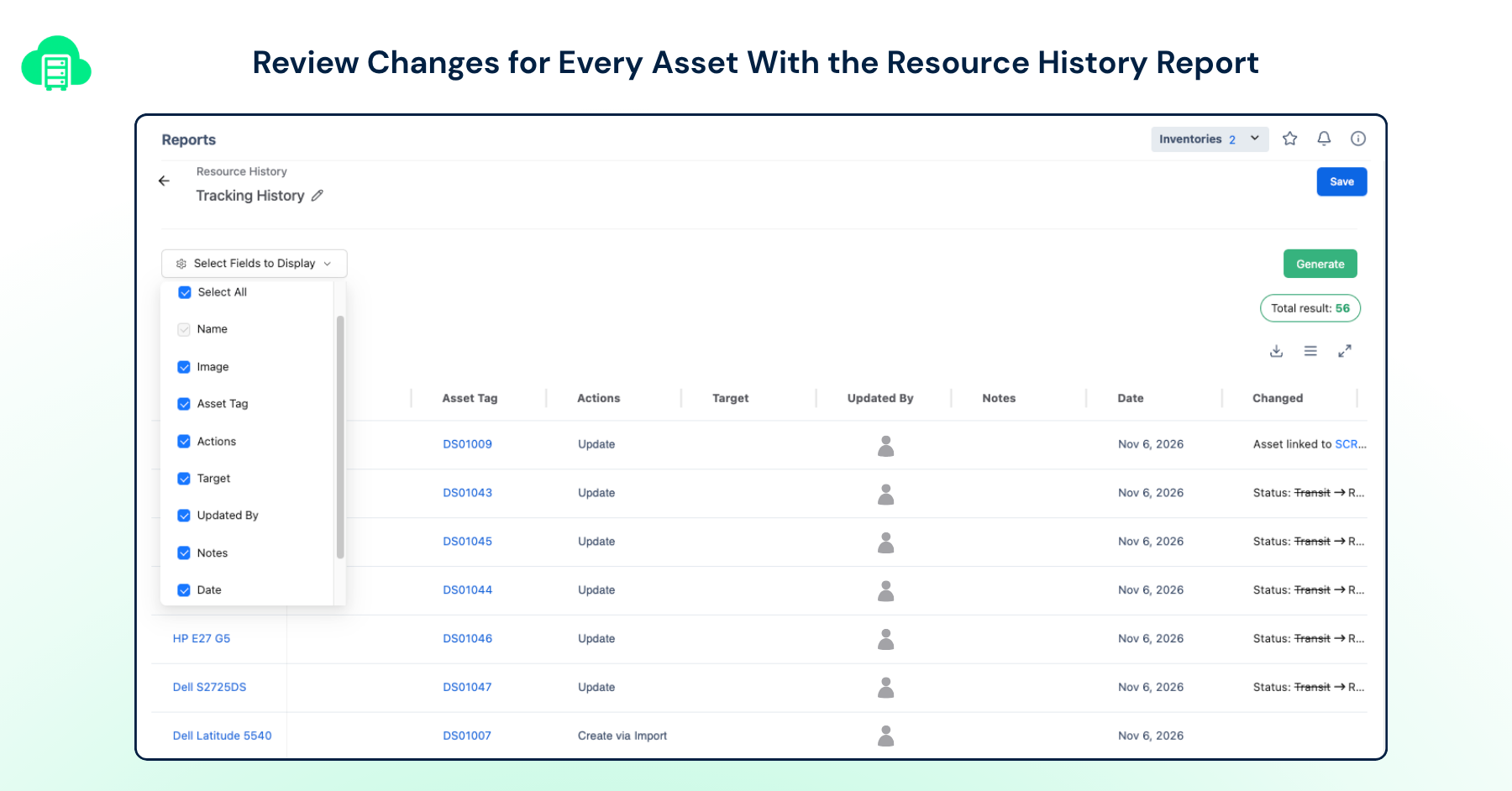
AssetIT’s History Report helps administrators review events such as check-in, check-out, assignment changes, and asset updates.
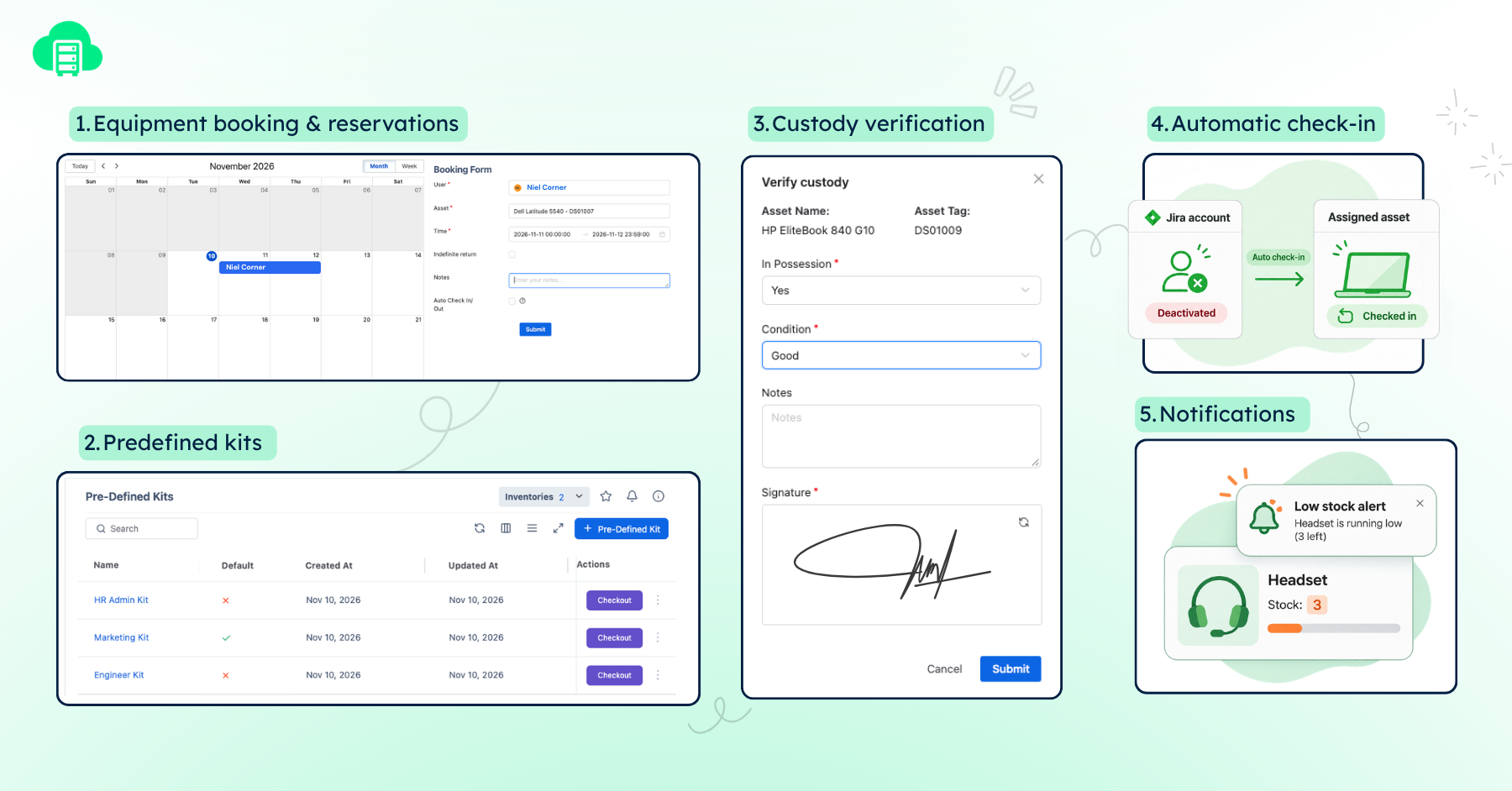
The Custody Verification feature allows IT teams to request confirmation that employees still possess assigned assets and record their condition. Digital signatures can also be required.
For distributed organizations, this creates a more structured process than sending dozens of emails asking, “Do you still have this laptop?”
AssetIT also provides notifications for overdue bookings, low stock, maintenance updates, and upcoming software license expirations.
These features help teams maintain operational records and identify issues that need attention. Whether they satisfy a particular audit requirement depends on the controls and evidence your organization needs.
What you can test: Select a device with several assignment changes, generate its history report, and request custody verification. Check whether the records answer the questions your internal auditor would ask.
Documentation: History Report | Custody Verification | Notification Settings
6. If Atlassian Assets is included with Jira, why would I need AssetIT?
This is probably the most important question.
Atlassian now includes the core Assets platform on all paid Jira, Jira Service Management, and Service Collection plans, as well as Teamwork Collection sites. Included object allowances vary depending on the plan.
I think that’s good for customers.
Atlassian Assets provides a flexible way to model assets, configuration items, infrastructure, services, and their relationships. Teams can create schemas, define attributes, query objects using AQL, automate operations, and connect objects to Jira work items.
For many organizations, those capabilities will be sufficient.
But there’s a difference between managing asset records and running everyday asset operations.
Consider a company with shared laptops, monitors, and equipment.
Employees need to reserve devices for particular dates. IT needs to approve requests, manage returns, and keep track of who has what.
When someone joins, they may need a predefined equipment kit. When they leave, IT needs to recover their assigned resources.
And occasionally, the company needs everyone to confirm which devices they still possess.
These are workflows AssetIT provides through ready-to-use functionality:
Equipment booking and reservations
Predefined kits for resource allocation
Custody verification with optional digital signatures
Automatic check-in when a Jira account is deactivated
Notifications for low stock and license expiration
Atlassian Assets has its own automation and lifecycle management capabilities, particularly when combined with Jira Service Management. I’m not suggesting these workflows are impossible with native Atlassian tools.
The question is how much functionality is available out of the box, how much configuration you need, and how the resulting workflow feels to the people using it.
For example, try setting up an equipment booking process in both environments.
Can an employee select an available device for a particular date? Can IT approve the request, record the return, and review assignment history?
Then try employee onboarding and custody verification.
If Atlassian Assets already handles your requirements effectively, there may be no reason to add another application.
If you need AssetIT’s packaged operational workflows, that’s where a dedicated app may make sense.
One thing to know if you plan to use both products: AssetIT doesn’t currently provide built-in synchronization with Atlassian Assets, and that capability isn’t included in the roadmap outlined below. Check the available migration and integration options before designing a workflow that depends on both systems.
What you can test: Choose two or three workflows your IT team performs every week. Implement them in both products, then compare the setup effort, daily user experience, permissions, and reporting.
That’s where the practical differences become much clearer.
Atlassian documentation: Assets in Jira vs. Jira Service Management | What’s in Assets for Cloud?
A Practical Checklist Before Choosing an Asset Management App
Whether you’re considering AssetIT, Atlassian Assets, or another Marketplace application, I’d spend less time counting features and more time testing real work.
Here are five checks I recommend during a trial:
Import real device information. Test how the app handles missing fields, changed assignments, duplicates, and synchronization failures.
Manage one complete asset lifecycle. Assign equipment, record maintenance, transfer ownership, and process the return.
Handle a Jira service request. Check whether the agent can find and update the required asset information without unnecessary context switching.
Test permissions and accountability. Use several roles, review asset history, and complete a custody verification.
Evaluate operational requirements. Review security evidence, deployment options, support commitments, realistic performance, and the total cost of configuration and administration.
These exercises will reveal differences that a feature checklist might miss.
One product may offer deeper integrations. Another may provide better operational workflows. Some teams may prefer Atlassian’s native platform, while others need more specialized functionality.
The important thing is knowing which problems you’re paying to solve.
Where AssetIT Is Heading
We’re planning to expand AssetIT into Network Discovery, SaaS Asset Management, and Cloud Asset Management.
Our goal is to help Jira teams gain better visibility into network-connected devices, SaaS applications, and cloud resources while keeping asset ownership and operational workflows connected.
These are roadmap directions, not features available today. We haven’t announced release dates or specific connector commitments, and the details may change as development progresses.
Meanwhile, we’re continuing to invest in AssetIT’s performance, reliability, security, and existing workflows.
There’s always something new we could build. Making what’s already there work better deserves just as much attention.
Making an Informed Decision
If you’re evaluating AssetIT, I’d encourage you to try it with your real requirements, review the documentation, and ask us difficult questions.
We won’t always have every feature you’re looking for. When that’s the case, I’d rather explain the limitation than pretend otherwise.
A good product comparison shouldn’t tell you which product to buy. It should help you ask better questions before you buy it.
Explore AssetIT
AssetIT on Atlassian Marketplace
Atlassian Enterprise Certified Program
This article reflects documented capabilities reviewed on November 10, 2026. Features, integrations, Marketplace requirements, and product roadmaps may change. Please check the latest documentation when evaluating a solution.


Recent Comments