


Every IT asset audit tells the same awkward story. The register says one thing, the office says another, and someone has to explain the difference to finance by Friday. Usually nobody did anything dramatically wrong. The records just drifted, one small unrecorded change at a time.
Oddly, that’s the good news. Drift has predictable causes, and most of them happen in ordinary moments like a laptop swap, a card purchase, or a rushed offboarding. Once you know where drift comes from, you can catch it before an audit does. We’ve seen the same six causes behind almost every messy register, so that’s where we’ll start.
What “Record Drift” Actually Means
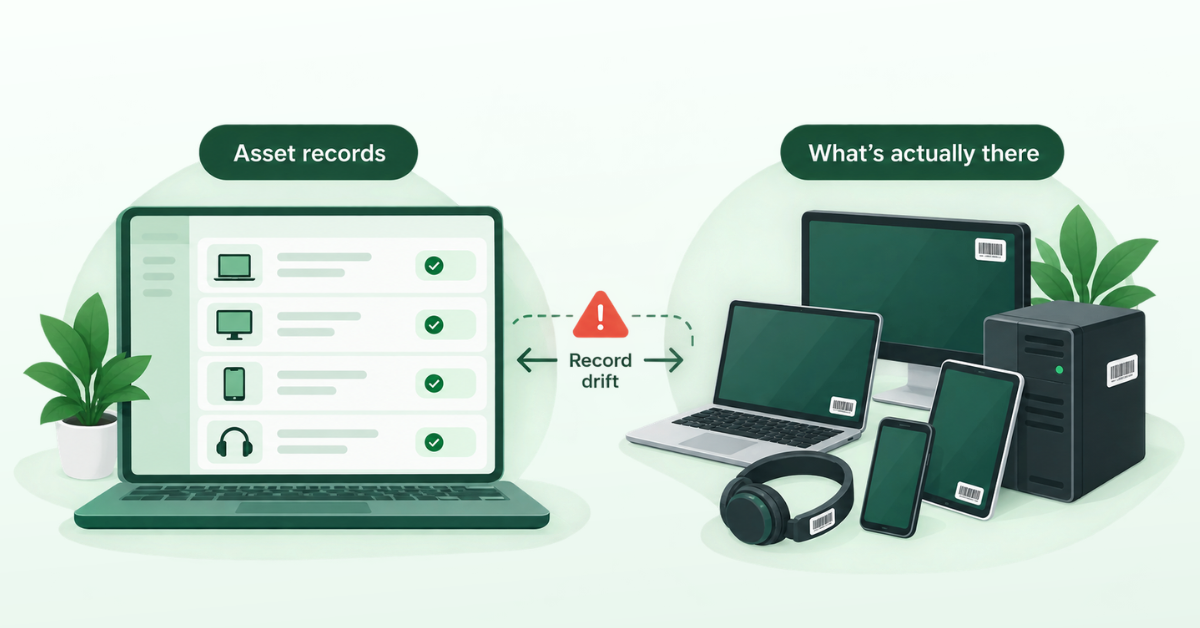
Record drift is the gap between what your asset records say and what’s really there. Finding that gap is the main job of an IT asset audit. Drift comes in three forms.
A ghost asset is in your records but no longer exists. Someone lost it, recycled it, or took it home after leaving, and nobody updated the record.
A zombie asset is a device that is in use but was never recorded. In IT operations, “zombie” often means an idle server that keeps running. Here it means a working device your register doesn’t know about.
A stale record is a real asset with the wrong details. The owner left months ago, or the record says “Headquarters” but the laptop is in someone’s home.
Here’s the surprise. Matching totals don’t mean your data is right.
Say your records show 400 laptops, and the count finds 400. Looks fine. But 20 records are ghosts and 20 laptops are zombies, so the two errors cancel out. Another 35 records list the wrong owner. That “clean” count hides 75 problems, almost one in five devices. An IT asset audit that only checks totals will pass this register. One that checks each record won’t.
The Everyday Causes of Drift
Drift rarely comes from one big mistake. As AssetLoom’s blog explains in its breakdown of why IT asset inventories become unreliable, it usually comes from normal work that skips the record. Here are the six causes we see most.
1. A Team Buys Laptops On A Company Card
A team lead needs two laptops for new hires starting Monday. IT is busy, so the lead buys them online with a company card. Nobody adds them to the register. IT only finds out when one breaks and someone brings it to the helpdesk.
2. A Laptop Changes Hands Inside The Company
A developer moves to the data team and gives their old laptop to a new hire. Nobody tells IT. The record still shows the developer. When the laptop goes missing, IT contacts the wrong person first, and the search starts from zero. In our experience, this is the most common cause of all. Both people assume the other one told IT.
3. Employees Work From Home
Remote work spreads devices across many homes that IT can’t visit. The record says “assigned to Minh, Da Nang,” and that’s all anyone knows. If Minh gave the laptop to a family member, the record won’t show it.
4. Someone Leaves And The Laptop Stays “Assigned”
A contractor finishes a project and leaves on a Friday. HR closes the account, but nobody asks for the laptop back. The record keeps saying “assigned” for 14 months, until the next IT asset audit. By then, nobody knows if the laptop is in a drawer or listed on eBay.
5. A Device Comes Back From Repair
A laptop gets a warranty motherboard replacement. The sticker on the case stays the same, but the serial number stored on the board has to be re-entered by the technician. When they skip that step, your device management tool shows a blank serial or a duplicate device. Now your register and your management tool disagree, and someone spends an hour proving it’s the same laptop.
6. Several People Edit The Same Spreadsheet
One person types “Latitude 5440,” another types “Latitude5440,” and a third leaves the model field empty. None of these mistakes look serious alone, but together they turn into ghosts and stale records.
How Each Cause Shows Up In Your Records
This table shows the drift type each cause creates and which audit direction catches it.
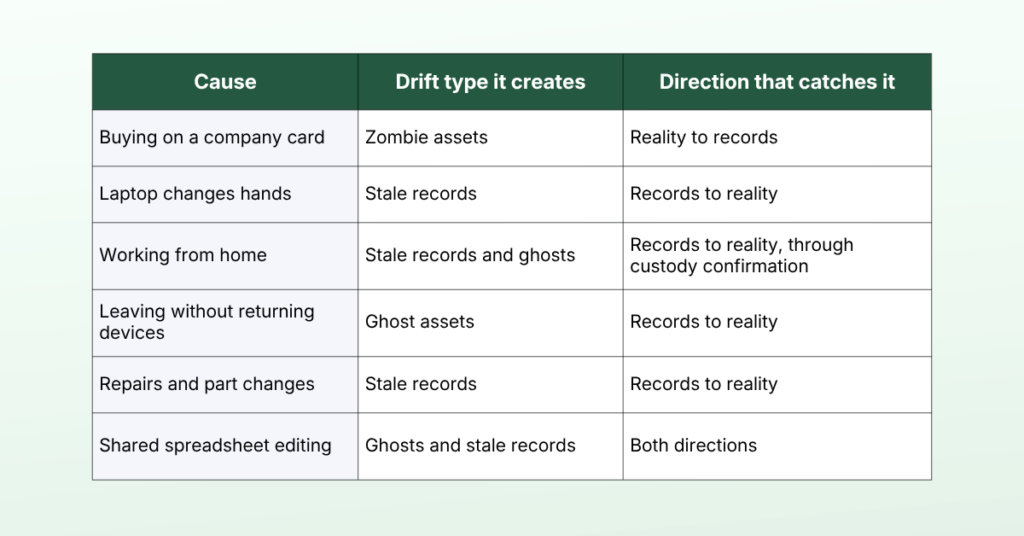
No single direction catches everything. Card purchases create zombies, and only checking from reality back to your records will find them.
What Drift Costs When the IT Asset Audit Arrives
Drift is cheap while it builds and expensive when someone finally finds it. That usually happens all at once, during the IT asset audit. Here’s what it costs.
Cleanup that eats your audit weeks. Someone has to fix every mismatch by hand. In the 400-laptop example, 75 mismatches at 15 minutes each is almost 19 hours of work, and that’s before anyone waits for replies from former owners.
Buying what you already own. The register shows zero spare laptops, so IT orders 10 for next month’s new hires. Two weeks later, someone finds 7 unrecorded laptops in a cabinet on the design team’s floor.
Software license risk. Many licenses are counted per device or per user. Unrecorded devices can push you over your limit, and missing devices make it hard to prove software was removed.
Wrong numbers for finance. Depreciation depends on knowing which assets exist. When records include missing devices and skip unrecorded ones, the numbers are wrong in both directions.
A loop of lost trust. When people see the records are wrong, they stop updating them and start asking around the office instead. The data gets worse, and every IT asset audit that finds heavy drift makes the next one harder.
Security gaps. Remember the contractor who left on a Friday? Their laptop, still marked “assigned” 14 months later, may still hold synced email and project files. The record says everything is fine, so nobody thinks to lock or wipe it.
Reconciling Physical and Digital Records
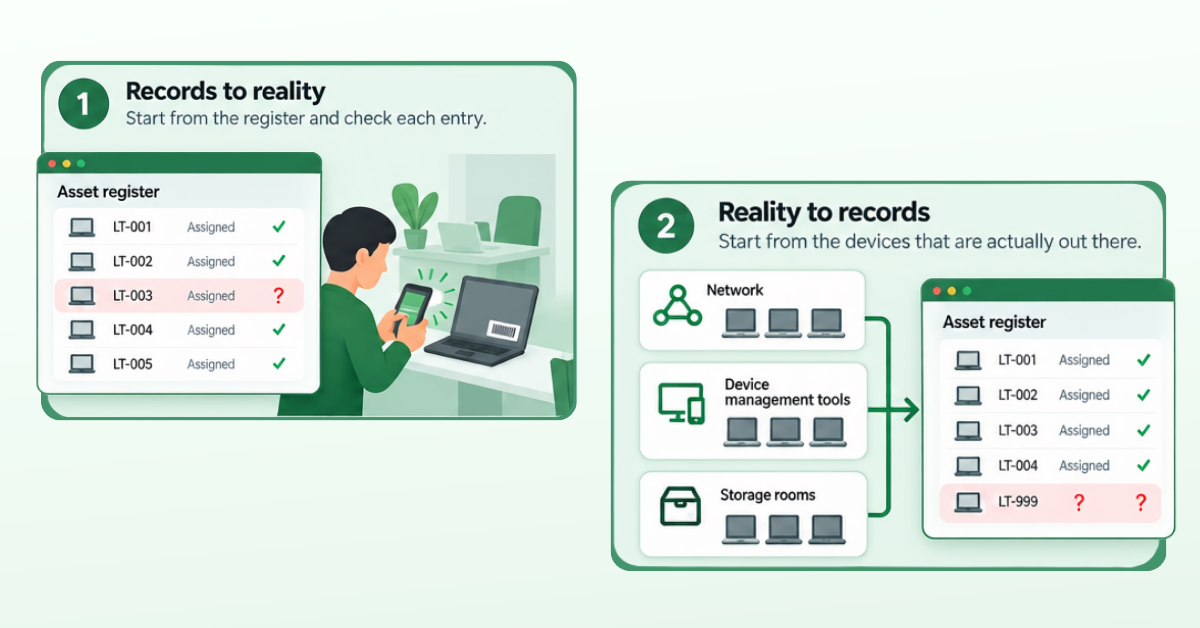
Reconciliation is the core of any IT asset audit. It works in two directions, but most teams only check one.
Records to reality. Start from the register and check each entry. Does the device exist? Is it where the record says? Does the listed person really have it? Scan tags in the office and ask remote employees to confirm their devices. This catches ghost assets and stale records.
Reality to records. Start from the devices that are actually out there. Look at your network, your device management tools, and your storage rooms, then check if each device is in the register. This catches zombie assets.
Checking only one direction gives you half the picture. Go back to the 400-laptop example.
Records to reality only. You find 20 missing laptops. Finance writes them off, or IT orders replacements, while 20 unrecorded laptops are already in use.
Reality to records only. You find the 20 zombies but miss the 20 ghosts. The register keeps listing laptops that are gone.
A complete IT asset audit checks both directions, then gives every mismatch an owner and a deadline. For the day-to-day side, see these methods for tracking IT assets across departments.
Keeping Records Accurate Between Audits
The best way to survive an IT asset audit is to stop treating it as a once-a-year event. Some teams spend weeks cleaning data before each audit, then let it drift the next day again. Teams that stay audit-ready keep records correct as they go.
Three habits do most of the work.
Update the record when the asset changes. When a laptop is handed over, repaired, moved, or retired, update the record in the same step. This fixes drift from handovers and repairs.
Give every asset a named owner. “The marketing team” is not an owner. A named person is, or a named role for shared equipment. When someone leaves, you know exactly what they hold. This fixes offboarding gaps.
Ask employees to confirm their devices. Send a short custody check every quarter or twice a year. Ask people to confirm the asset tag or serial number, not just click “yes.” This covers remote staff that IT can’t see.
For teams that manage assets in Jira, AssetIT’s Verify Asset Custody feature supports that last habit. Admins can send custody requests one by one or in bulk, and users confirm both that they have each assigned asset and its condition.
Conclusion
Record drift isn’t a sign that your team is careless. It’s what happens when ordinary changes skip the record, and matching totals can hide all of it. Reconcile in both directions, update records when assets change, give every device an owner, and let employees confirm what they hold. Do that consistently and your next IT asset audit becomes a quick check instead of a painful surprise.
FAQs
1. How often should you run an IT asset audit?
Many organizations run a full IT asset audit once a year, often at financial year-end. Teams with fast hiring or many remote staff add quick quarterly checks, like spot checks or custody confirmations.
2. What’s the difference between an IT asset audit and an inventory count?
An inventory count checks how many assets you have. An audit checks whether each record is correct, including owner, location, and status. A count can match while many records are still wrong.
3. What should you do when a device can’t be found during an IT asset audit?
Contact the last known owner and check your device management tool for recent activity. If it’s still missing after a few tries, lock or wipe it remotely, mark it as lost, and tell finance.
4. How do you include remote employees in an IT asset audit?
Ask each employee to confirm their devices by asset tag or serial number. Then compare their answers with your device management data. Anything that doesn’t match becomes a follow-up with a named owner.
5. Why do asset records keep drifting after a clean audit?
Card purchases, laptop swaps, repairs, and rushed offboarding keep happening after the audit ends. If records only get fixed at audit time, drift commonly starts again. Updating records at the moment of change keeps them accurate.





Recent Comments